How it works
Enter once. Validate. Synchronize.
Product information starts in engineering. xSync connects it to ERP and returns the feedback your team needs.
Engineering CAD / PDM
- Materials & ItemsProduct information
- BOMAssemblies and components
- DocumentsEngineering documentation
Integration
- Map fields
- Validate data
- Synchronize
ERP Enterprise
- Materials & ItemsERP material records
- BOMProduct structures
- DocumentsDocuments in ERP
ERP feedback returns to engineeringERP identifiers, synchronization results and relevant information.
Create information in engineering
Materials, items, product structures and documents start in your engineering environment. xSync connects that information to the ERP process, reducing repetitive data entry.
Map and validate the data
Configure field mappings, validations and the fields transferred to ERP. Check required information before synchronization so users can correct the relevant engineering data.
Exchange information with ERP
xSync sends product information through the configured integration. ERP-specific business logic and transactions remain on the ERP side, with your ERP administrator or partner.
Return useful feedback
ERP identifiers, synchronization results and relevant information return to engineering. Users can see what needs attention and continue working with the correct data.
Your process.
Your rules.
Configure the exchange around the information your business needs.
xSync supports configurable field mapping, validations, transferred fields and many business rules.
Your ERP administrator or integration partner may adapt the ERP-specific logic. Together, these settings define how engineering data enters the ERP process and how results return.
Explore integrationsNo log hunting.
No guessing.
Clear synchronization feedback, where engineers need it.
When information needs attention, identify the relevant data, correct it and continue. The illustrated example shows a completed BOM export and its result.
Fix the data. Not the integration.
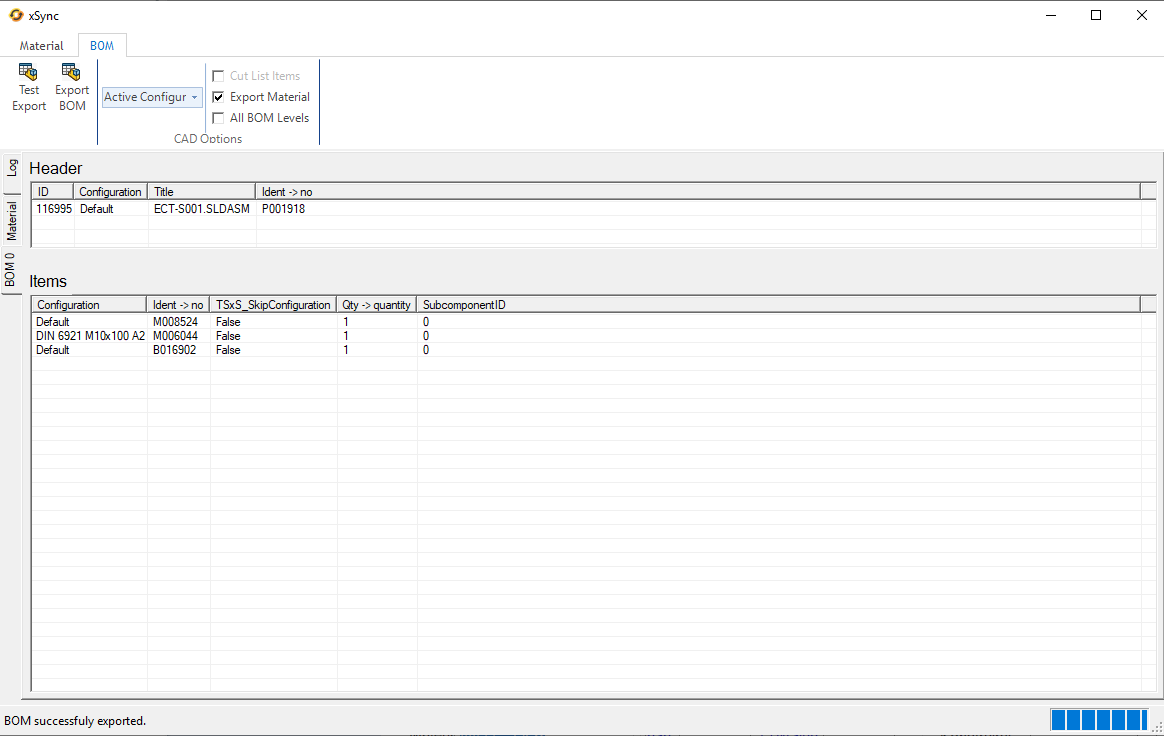
A completed BOM export, with its result shown directly in xSync.
Let your engineers engineer.
Show us how product information moves between engineering and ERP. We’ll explore where xSync can simplify your process.